Getting Started with Claude Code: My Tips and Setup
My Journey to Claude Code
Coming from a traditional coding background, letting go of line-by-line control felt (and still feels) weird. But in the bigger picture, code has always been a means to an end for me: building a working product that solves a problem. The implementation details are important, but secondary. The core question in Software Engineering today is "Am I building the right software?" and less "Am I building the software right?"
With AI coding tools (Claude Code, Cursor, Codex, and others), the bottleneck of software engineering has shifted: it's now about understanding business requirements and validating implementations against them. Code is cheap now.
What I use Claude Code for:
- Full Stack Engineering: Frontend, Backend, Testing, Debugging, Database design
- LLM Prompt tuning for AI-centered software
- DevOps tasks (CI/CD, Infrastructure as Code)
- Documentation (both for humans and Agents)
- One-off data analysis, processing and crawling
- Project Management (writing and refining issues and PRs)
Where I'm not using it yet:
- Business Strategy
- Communication with my team and stakeholders
- Communicating and presenting new features to end users (I should do this...)
From Cursor to Claude Code
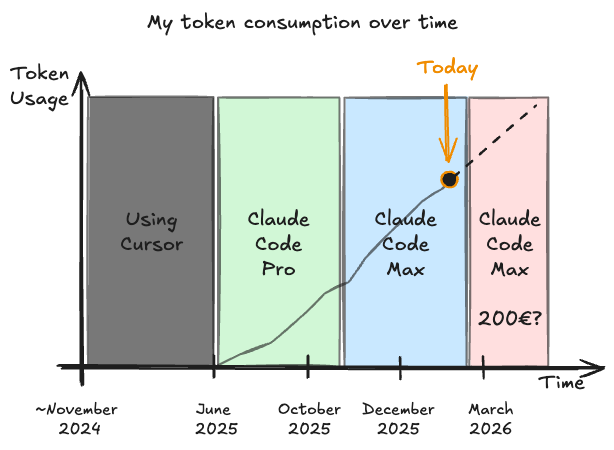
Until July 2025, I used Cursor as my primary AI coding assistant. Claude Code in the terminal felt alien at first. Quite disconnected from my workflow.
Thankfully the VS Code extension exists though! Having Claude Code integrated into my editor with sleek diffs made it much easier to verify and understand changes. That was the tipping point for me to switch over.
Tooling
ClaudeBar for Tracking Sessions
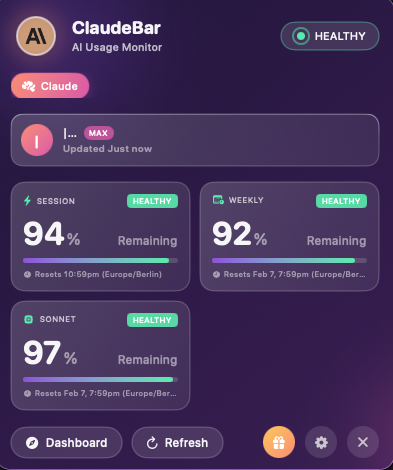
I'm using ClaudeBar for a nice overview of current sessions and the weekly limit. It also shows a quick indicator in the menu bar.
VS Code Extension vs. Terminal
I'm using the VS Code extension for Claude Code of the time.
Good:
- Better image copy-pasting and preview
- Handy button to start a new session
- Better diff view
- Better session history access
Bad:
- No direct access to memory functionality (via
#) - Just a hunch, but I think the extension has crashed VS Code 3-4 times so far
Advice: Test both and see which one feels better to you. I recently also used the Terminal App again more often - especially the memory functionality and subagent seems better.
CLIs for Tool Interaction
MCPs are IMO overrrated. Let Claude use the CLI commands of your tools. E.g. the GH CLI for checking out issues and PRs works really well. Claude might try to call the APIs via curl and managing auth is annoying for that. So I have a note about this in my CLAUDE.md.
Voice Input for Faster Prompting
Models handle natural language remarkably well. Even if you ramble, contradict yourself, or speak for extended periods, the model will parse through it. But the more context you provide—and the less the model has to guess—the better your results.
This makes voice transcription tools surprisingly effective for Claude Code. You can describe what you want naturally, add context as you think of it, and let the AI sort through your stream of consciousness.
Tools I'd recommend:
- SuperWhisper — My current choice. Runs locally on Apple Silicon, multiple AI models for accuracy, works offline for privacy. ~$8/month or $250 lifetime.
- VoiceInk — Open source alternative. One-time $25 purchase, 100% offline, 99% accuracy. Great value.
- Wispr Flow — Cloud-based but works everywhere. Has AI editing built-in to polish your transcriptions. ~$12/month.
Workflow Best Practices
Good Plans save Time
Claude Code has a planning mode (toggle with SHIFT+TAB) to collect context, ask questions, and create a detailed step-by-step plan to implement the feature. If the plan is incomplete, features might be implemented incomplete and you will find yourself iterating with the model via multiple follow up edits. Better invest a few minutes more time upfront and reach the highest satisfaction, when Claude can get it done on a single prompt. ❗️ Invest your time here, it pays off. This is the single biggest influence on how well Claude Code is going to perform for your problems.
Committing Prevents Headaches
Use CC to commit and commit often. Claude will make mistakes and you will find yourself wanting to revert some of the changes. Reverting is always easier if you don't mix up logic. So committing is key.
Additionally, this is extra context for you and Claude. The commit history with good messages makes browsing recent changes easier and comes in handy when debugging.
Start with Boilerplates, Not from Scratch
Claude Code isn't great at bootstrapping projects from zero. Instead, I start with either create-next-app or my own Vite boilerplate depending on the project.
This gives me three advantages:
- My standard stack (React, useQuery, shadcn, Tailwind, TypeScript, ESLint, ...) is configured correctly from the start
- Claude doesn't waste tokens figuring out how to wire up tooling
- I don't waste my time with Claude messing it up. Been there...
Mainstream and modern libraries also have more surface area in Claude's training data. So it produces better results with them (kind of leading to a vicious cycle of everyone using the same tools over time).
Classic Dev Practices Help Claude Too
I run Prettier and ESLint on all my projects, with unit tests on most. Combined with Husky pre-commit hooks, this creates a feedback loop: Claude generates code, the hooks catch issues, and Claude fixes them before committing.
Deterministic checks beat written instructions. You can tell Claude "keep files under 1000 lines" in CLAUDE.md, but a linter rule that enforces it will actually make Claude comply. Codify your standards wherever possible.
Documentation
What Should Be in Your CLAUDE.md?
First: What is it? It's a text file that is prefixed to every Claude Code conversation.
The core principle: Document whatever you find yourself explaining repeatedly to the model.
Good candidates:
- Business context — What the software does, the domain, the bigger picture
- Dev commands — How to start the server, run tests, build
- Conventions — Naming patterns, file structure, preferred libraries
- Pointers to deeper docs — This is key (see below)
But also bear in mind: Context rot is real. Keep the things that are relevant for most tasks in this CLAUDE.md.
Link to In-Depth Documentation
I keep detailed documentation in Markdown files throughout my codebase and you can think of it like an internal knowledge base. This is helpful both for humans and for Claude. In CLAUDE.md, I reference these with short summaries so Claude knows where to look:
## Documentation

- See `docs/api.md` for API endpoint conventions
- See `docs/testing.md` for test patterns and fixtures
- When changing technical details, update the relevant docs
This gives Claude the ability to self-serve detailed information without bloating your CLAUDE.md.
Beyond Coding
Claude Cowork?
- Currently I think it's good for one-off tasks which require desktop access. Letting it search for an invoice in my inbox or setting up email filter rules worked, but still required some intervention.
- For repeatable tasks, I'd prefer having scripts and reliable automation instead. That's cheaper and faster.
- With that said, I think Claude Code is similarly capable in non-coding tasks. I recently wrote a whole business plan with financial planning for a grant application using Claude Code in VS Code. It worked really well using Markdown files and in the end creating PDF and Excel files. Software Engineering tooling like git and markdown is also perfect for this.
Further Reading
Looking for more advanced tips? Check out Part 2: Claude Code Power User Tips for subagents, skills, hooks, and workflow optimizations.
The AI coding space is noisy. Two voices I find consistently valuable:
- Boris Cherny — Lead Dev on Claude Code
- Simon Willison - Shares great LLM and engineering insights